
iuli24
Active member
- Joined
- Apr 13, 2021
- Messages
- 61
- Reaction score
- 74
- Server
- Askone
- Main Pilotname
- Za_Jul14n
- Rank
- 99
- Clan
- Monarch
As "promised" I made a bug list here with stuff I found most important for now. (it is by far not complete and does not cover every bug present in game for now)
I am aware that some of what I paste down below either was already fixed / is in the process of being fixed / may be fixed in the future. I am posting the fixed ones too for proof or record as requested by @StickManTwit / devs (I am in a sort of holiday so I didn't have time to post xd)
For the stuff that was already fixed. I just want to say @Highway @Narokath @Alewx etc (idk if I tagged all of you or not)... no idea what tools you use.. llms.. whatever (not that I care thaat much XD) but keep doing what you do because you guys are cooking recently. Logged in today to find the stuttering from drone switching not only fixed but completely gone. I have noticed this on other patches recently and it seems that you do manage to fix them properly and forever. Absolutely fantastic . I haven't had the time yet to check the white cooldown fix but considering the recent track record its likely gone as well.
Bugs that are already fixed but I didn't post fast enough XD:
(DISCLAIMER: The info I give on potential solutions / causes is from before the patch/es were live. The info in this section is what I considered might be happening at the time and might no longer be relevant / might be wrong!)
1. White cooldowns / items that are simultaneously active and in cd at the same time (thus.. white) (easy to reproduce)
Steps to reproduce: Use speed actuator until ~50-80% of its runtime (this item works best), orbit, land, wait for the cooldown to be ready and instantly turn it on.
Likely cause: Desync between the client and the server when zones are changed while an item is cooling down. The server knows X time left for that item but the client somehow leaps ahead and thinks the item is ready when its actually not.
Potential solution/s / workaround/s: Use the same code logic that deactivates running items when going to orbit as a right mouse button click event (example: speed actuator was given to a friendly player, orbiting leaves the friendly player with no speed actuator running, right click on the active item to do the same thing on planet even on white items to reset them) Similar to how players can deactivate items that are about to activate by right clicking them. (example: protector starting to activate.. right click.. cancels the action before turning on the item)
2. Drone switching stuttering (easy to reproduce)
Steps to reproduce: Right click on any drone to activate / deactivate / or to activate a drone past the max active drones number of 3.
Likely cause: Player ship rerender triggered by drone switching causing a small but perceptible and jarring stutter.
Potential solution/s / workaround/s: Don't trigger a rerender of the player ship when switching drones.
Bugs that are not yet fixed:
1. DS heads (custodian commander ds) and / or ds body (rocketeers marauders) are not rendering fast enough causing unexpected player deaths trough out the game (easy-medium difficulty to reproduce)
Steps to reproduce: Knowing ds paths, fly fast (afterburner) into said DS. Most of the time the resurrector will render first, followed by a very delayed rocketeer and marauder render and with an even more delayed custodian commander head render. This causes most players including myself to be taken by surprise (being stunned by seemingly nothing.. then rocketters, resurector and marauder render and sometimes the custodian commander head renders after me podding). This slow render happens on free roaming custodian commanders too on R60 earth for example. This effect does not happen with signor DS heads on R60 sol for example. So there is something about the mantis Custodian Commander.
Likely cause: Talked to stickman. The polygon count for the custodian commander model doesn't seem to be the issue. It's very likely something else. Can't quite put my finger on it since its such an odd thing to happen.
Potential solution/s / workaround/s: N/A (honestly no idea what's causing this.)
2. Some ingame timers are slower than realtime (easy to reproduce) (there are multiple bugs here)
Steps to reproduce: Ingame mission timer notifications are desynced from the real mission timer in the left mission log panel ingame (the one that opens with CTRL). The desync is usually constant and ~5s apart. Many missions have been failed because the log in the hud said 00:00 meanwhile the actual real mission timer was at ~00:05. Server restart timeout drifts ahead the more you stay in the same game zone, sometimes by minutes. Changing zones gets the timer to be very very close to the actual server restart timeout, but it still starts to drift again no matter if you changed zones previously or not. This causes the ingame top left timer to "lie" to players saying there are 2-3 minutes left until a restart when the notification in the hud can say 15s left.
Likely cause: Desync between the server and the client.
Potential solution/s / workaround/s: For the mission timers.. try to time them closer to real time so that the notification doesn't "lie". For the ingame server restart timeout: N/A / no idea.
(on this one i'm not entirely sure if it was sortof kindof fixed in the most recent bugfix patch? will have to retest but you guys can also test to see if it reproduces with the latest patch)
3. Spamming the materialize button / notification in hud for revive can cause multiple permanent hud notifications to stick, usually happens most often in OTB (easy to reproduce)
Steps to reproduce: Pod anywhere ingame, spam the notification in the hud, spam materialize until the timer finishes, you get 1-2 notifications to stick in the hud. This is repeatable in the sense that if you die again, spam the buttons again and materialize you can have upwards of 5-6-7 notifications stuck on screen.
Likely cause: Race condition in the code that does not like having the button clicked too fast.
Potential solution/s / workaround/s: Make sure only 1 notification is allowed to be on screen and only when the player is in a pod. Once in hangar / materialized.. have the notification dissapear.
4. Hangar ship drone slot input fields resize based on if a drone is installed or not (easy to reproduce)
Steps to reproduce: Have a ship with all drone slots occupied. All slots are the same size: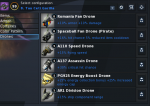
Then remove any of the drones especially the middle ones:
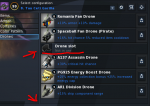
The drone slots that are empty become smaller which causes tons of missclicks if players try to switch drones quickly because the drone slots keep shifting around.
Likely cause: (my web dev exp comes in handy here) The gui container that holds the drone icon and the empty drone icon is dynamic, based on the content size inside. It tries to resize to the smallest size it can that fits the content perfectly.
Potential solution/s / workaround/s: Make the empty drone slot icon the same size as the drone icons. This way the gui container will be forced to keep the same size regardless if a drone is installed or not.
5. Switching ship configurations with drones installed can sometimes cause a secondary configuration to either not show drones when it actually has them or it can cause the drone slot field to not clear when clicking the unequip button (medium - hard difficulty to reproduce)
Steps to reproduce: See video recording. Sorry for the google drive link (can be viewed directly in browser) but this forum doesn't accept video files... https://drive.google.com/file/d/1QYK8jL0ehxMDVdcUvqWyz3Ik1DzU8ogG/view?usp=sharing (I simply entered hangar with a ship with no configurations. switched to a ship with configurations (griffon for that example but it happens on other ships too) and et voila. Bug triggered.
Likely cause: The drone slots code doesn't properly adjust to the currently selected ship config and doesn't update accordingly.
Potential solution/s / workaround/s: Make sure the indexing / etc is correct.
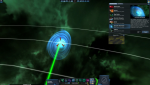
6. Typo in draconis wormhole description (credit to @Malevos for sending me the screeshot and typo)
"safe passage" not "save passage"
Now that you've reached the end of this post I want to say this:
I am very glad I can assist the community with bug reporting and etc and I hope to be able to keep doing it. I love that bugs are getting fixed and in a smaller or larger way.. I influence the game to be better for everyone.
This is by far not the end of the bug list. This is what i considered to be more or less important for now and what the community would appreciate more. There will be more coming soon (coming days / weeks when I manage to come back from my holiday and I manage to remember all the bugs glitches and whatnot and put them together in bug lists xd)
I will also make a new post in the feedback section with ideas for improvements QOL things too.
Looking forward to collaborating more
I am aware that some of what I paste down below either was already fixed / is in the process of being fixed / may be fixed in the future. I am posting the fixed ones too for proof or record as requested by @StickManTwit / devs (I am in a sort of holiday so I didn't have time to post xd)
For the stuff that was already fixed. I just want to say @Highway @Narokath @Alewx etc (idk if I tagged all of you or not)... no idea what tools you use.. llms.. whatever (not that I care thaat much XD) but keep doing what you do because you guys are cooking recently. Logged in today to find the stuttering from drone switching not only fixed but completely gone. I have noticed this on other patches recently and it seems that you do manage to fix them properly and forever. Absolutely fantastic
. I haven't had the time yet to check the white cooldown fix but considering the recent track record its likely gone as well.Bugs that are already fixed but I didn't post fast enough XD:
(DISCLAIMER: The info I give on potential solutions / causes is from before the patch/es were live. The info in this section is what I considered might be happening at the time and might no longer be relevant / might be wrong!)
1. White cooldowns / items that are simultaneously active and in cd at the same time (thus.. white) (easy to reproduce)
Steps to reproduce: Use speed actuator until ~50-80% of its runtime (this item works best), orbit, land, wait for the cooldown to be ready and instantly turn it on.
Likely cause: Desync between the client and the server when zones are changed while an item is cooling down. The server knows X time left for that item but the client somehow leaps ahead and thinks the item is ready when its actually not.
Potential solution/s / workaround/s: Use the same code logic that deactivates running items when going to orbit as a right mouse button click event (example: speed actuator was given to a friendly player, orbiting leaves the friendly player with no speed actuator running, right click on the active item to do the same thing on planet even on white items to reset them) Similar to how players can deactivate items that are about to activate by right clicking them. (example: protector starting to activate.. right click.. cancels the action before turning on the item)
2. Drone switching stuttering (easy to reproduce)
Steps to reproduce: Right click on any drone to activate / deactivate / or to activate a drone past the max active drones number of 3.
Likely cause: Player ship rerender triggered by drone switching causing a small but perceptible and jarring stutter.
Potential solution/s / workaround/s: Don't trigger a rerender of the player ship when switching drones.
Bugs that are not yet fixed:
1. DS heads (custodian commander ds) and / or ds body (rocketeers marauders) are not rendering fast enough causing unexpected player deaths trough out the game (easy-medium difficulty to reproduce)
Steps to reproduce: Knowing ds paths, fly fast (afterburner) into said DS. Most of the time the resurrector will render first, followed by a very delayed rocketeer and marauder render and with an even more delayed custodian commander head render. This causes most players including myself to be taken by surprise (being stunned by seemingly nothing.. then rocketters, resurector and marauder render and sometimes the custodian commander head renders after me podding). This slow render happens on free roaming custodian commanders too on R60 earth for example. This effect does not happen with signor DS heads on R60 sol for example. So there is something about the mantis Custodian Commander.
Likely cause: Talked to stickman. The polygon count for the custodian commander model doesn't seem to be the issue. It's very likely something else. Can't quite put my finger on it since its such an odd thing to happen.
Potential solution/s / workaround/s: N/A (honestly no idea what's causing this.)
2. Some ingame timers are slower than realtime (easy to reproduce) (there are multiple bugs here)
Steps to reproduce: Ingame mission timer notifications are desynced from the real mission timer in the left mission log panel ingame (the one that opens with CTRL). The desync is usually constant and ~5s apart. Many missions have been failed because the log in the hud said 00:00 meanwhile the actual real mission timer was at ~00:05. Server restart timeout drifts ahead the more you stay in the same game zone, sometimes by minutes. Changing zones gets the timer to be very very close to the actual server restart timeout, but it still starts to drift again no matter if you changed zones previously or not. This causes the ingame top left timer to "lie" to players saying there are 2-3 minutes left until a restart when the notification in the hud can say 15s left.
Likely cause: Desync between the server and the client.
Potential solution/s / workaround/s: For the mission timers.. try to time them closer to real time so that the notification doesn't "lie". For the ingame server restart timeout: N/A / no idea.
(on this one i'm not entirely sure if it was sortof kindof fixed in the most recent bugfix patch? will have to retest but you guys can also test to see if it reproduces with the latest patch)
3. Spamming the materialize button / notification in hud for revive can cause multiple permanent hud notifications to stick, usually happens most often in OTB (easy to reproduce)
Steps to reproduce: Pod anywhere ingame, spam the notification in the hud, spam materialize until the timer finishes, you get 1-2 notifications to stick in the hud. This is repeatable in the sense that if you die again, spam the buttons again and materialize you can have upwards of 5-6-7 notifications stuck on screen.
Likely cause: Race condition in the code that does not like having the button clicked too fast.
Potential solution/s / workaround/s: Make sure only 1 notification is allowed to be on screen and only when the player is in a pod. Once in hangar / materialized.. have the notification dissapear.
4. Hangar ship drone slot input fields resize based on if a drone is installed or not (easy to reproduce)
Steps to reproduce: Have a ship with all drone slots occupied. All slots are the same size:
Then remove any of the drones especially the middle ones:
The drone slots that are empty become smaller which causes tons of missclicks if players try to switch drones quickly because the drone slots keep shifting around.
Likely cause: (my web dev exp comes in handy here) The gui container that holds the drone icon and the empty drone icon is dynamic, based on the content size inside. It tries to resize to the smallest size it can that fits the content perfectly.
Potential solution/s / workaround/s: Make the empty drone slot icon the same size as the drone icons. This way the gui container will be forced to keep the same size regardless if a drone is installed or not.
5. Switching ship configurations with drones installed can sometimes cause a secondary configuration to either not show drones when it actually has them or it can cause the drone slot field to not clear when clicking the unequip button (medium - hard difficulty to reproduce)
Steps to reproduce: See video recording. Sorry for the google drive link (can be viewed directly in browser) but this forum doesn't accept video files... https://drive.google.com/file/d/1QYK8jL0ehxMDVdcUvqWyz3Ik1DzU8ogG/view?usp=sharing (I simply entered hangar with a ship with no configurations. switched to a ship with configurations (griffon for that example but it happens on other ships too) and et voila. Bug triggered.
Likely cause: The drone slots code doesn't properly adjust to the currently selected ship config and doesn't update accordingly.
Potential solution/s / workaround/s: Make sure the indexing / etc is correct.
6. Typo in draconis wormhole description (credit to @Malevos for sending me the screeshot and typo)
"safe passage" not "save passage"
Now that you've reached the end of this post I want to say this:
I am very glad I can assist the community with bug reporting and etc and I hope to be able to keep doing it
. I love that bugs are getting fixed and in a smaller or larger way.. I influence the game to be better for everyone.This is by far not the end of the bug list. This is what i considered to be more or less important for now and what the community would appreciate more. There will be more coming soon (coming days / weeks when I manage to come back from my holiday and I manage to remember all the bugs glitches and whatnot and put them together in bug lists xd)
I will also make a new post in the feedback section with ideas for improvements QOL things too.
Looking forward to collaborating more